
Legal Document Scanner: The AI Guide to Contract Risk
What is a modern legal document scanner? Learn how AI tools analyze contracts for hidden risks in leases, job offers, and NDAs before you sign.
16 min read
Most advice about a legal document scanner is stuck in the filing-room era. It talks about feeder trays, scan speeds, and whether the machine handles legal-size paper. That advice isn't wrong. It's just aimed at the wrong problem.
The difficulty is not in converting a lease, NDA, or job offer into a PDF. Rather, it lies in understanding what that document can do to them. A renter needs to spot a fee buried in addenda. A freelancer needs to catch an IP grab. An employee needs to see whether a non-compete is narrow, broad, or reckless. That's where the meaning of legal document scanner has changed.
Table of Contents
- What a Legal Document Scanner Actually Does Now
- The Shift from Scanning Paper to Analyzing Risk
- How AI Scanners Analyze Your Contracts
- Key Features of a Modern Legal Document Scanner
- Real-World Use Cases for AI Contract Review
- Your Buyer's Checklist for Choosing a Scanner
- Interpreting Results and Taking Confident Action
What a Legal Document Scanner Actually Does Now
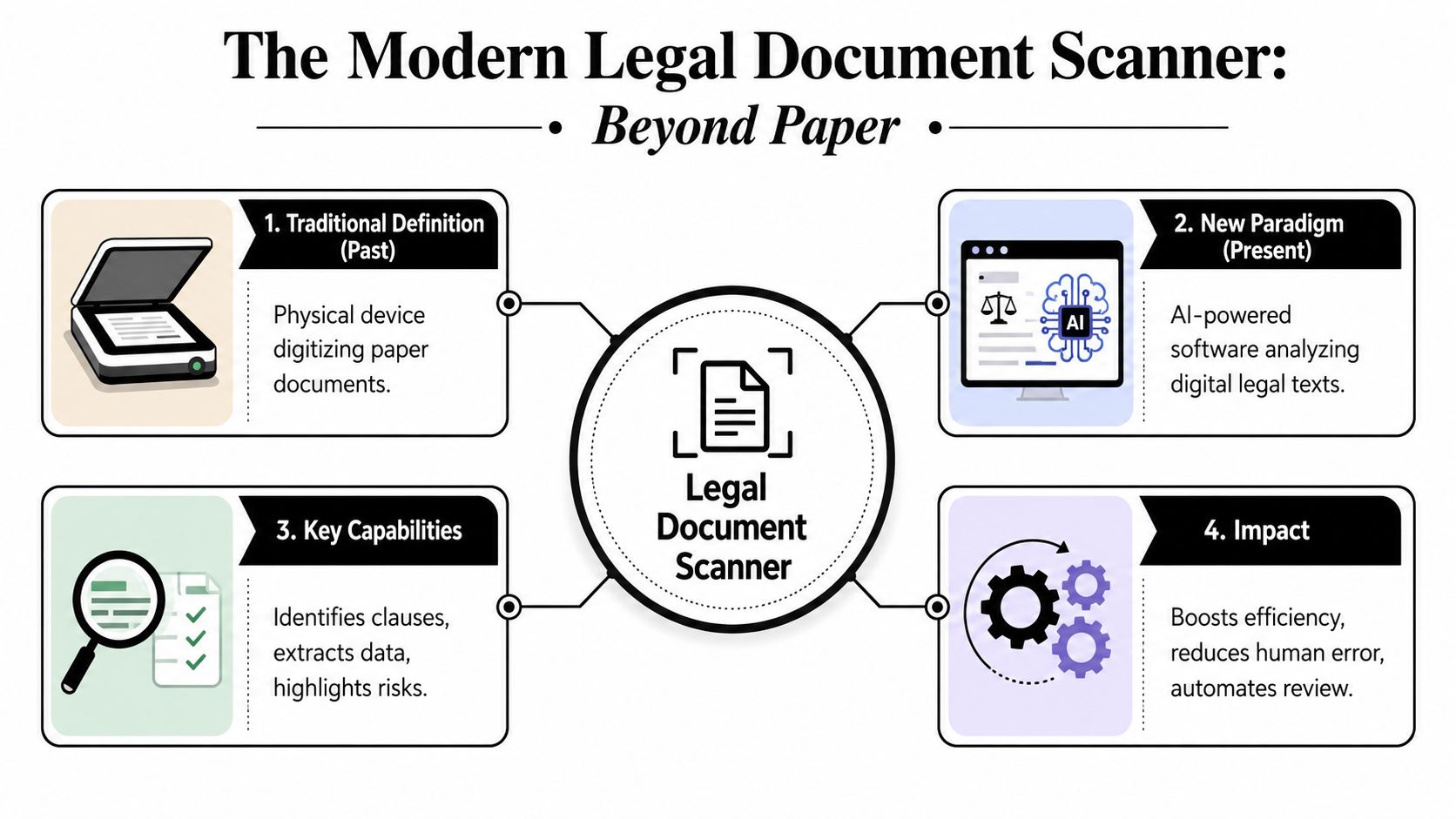
A modern legal document scanner doesn't just capture pages. It scans for legal risk.
That's the part most buying guides miss. Coverage in this category still leans hard toward hardware and digitization, even though the more urgent question for everyday users is what happens after OCR. As EdgeATL notes about the shift from scanning documents to scanning legal risk, the actual problem isn't merely turning paper into PDFs. It's extracting obligations, auto-renewals, and non-competes before signing.
The old definition is too narrow
For years, “legal document scanner” meant a machine built to handle long paper, duplex pages, and heavy office intake. That still matters for law firms, records teams, and anyone managing paper archives.
But consumers and small businesses face a different bottleneck. Their contracts often already arrive as PDFs, emailed attachments, screenshots, portal downloads, or phone photos. The friction isn't capture. It's interpretation.
A scanned lease that no one understands is just a searchable trap.
Practical rule: If a tool stops at text extraction, it's a document scanner in the old sense. If it helps you see obligations, leverage points, and ugly surprises, it's a legal scanner in the modern sense.
What people actually need from one
The useful version of a legal document scanner should answer questions like these:
- What am I agreeing to? Payment terms, notice periods, exclusivity, indemnity, liability caps, and cancellation rules.
- What's unusual? Language that's one-sided, broader than expected, or hidden in an attachment.
- What should I push back on? Clauses worth negotiating, not just clauses worth noticing.
- What does this mean in plain English? A summary that doesn't require a law degree.
That shift matters because contracts now hit people at speed. You get a freelance agreement on a Friday afternoon. A job offer lands with an attached confidentiality agreement. A landlord sends a revised lease and says it's “standard.” In those moments, no one cares how elegant the feeder mechanism is. They care whether the document surreptitiously transfers risk onto them.
The Shift from Scanning Paper to Analyzing Risk
Traditional legal scanning grew up around storage, retrieval, and evidence management. That's why the market history matters. In the document scanning services market, legal document scanning is projected to account for the largest share at 36.1% in 2026, while the broader market is estimated at US$ 3.76 billion in 2026 and projected to reach US$ 5.33 billion by 2033 at a 5.1% CAGR, according to Coherent Market Insights on document scanning services. Legal paperwork has long been one of the highest-value scanning categories because contracts and records need secure digitization, retrieval, and compliance-oriented handling.
What hardware solved well
In the paper-first world, legal teams cared about throughput and clean capture. For high-volume legal document scanning, office-class devices commonly target 25–40 pages per minute, 50–80 images per minute in duplex mode, and 30-sheet or larger automatic document feeders, as described in Dell's overview of scanners for legal-size documents. Those specs matter when you're ingesting discovery packets, contracts, and mixed-page files all day.
Hardware solved three practical problems well:
- Batch intake: Feed stacks of paper without constant babysitting.
- Full-page capture: Preserve legal-size pages without cropping key margins.
- Archival consistency: Create images that are searchable and easier to store.
OCR was the bridge, not the destination
OCR changed the game because it turned page images into machine-readable text. Once the text became searchable, teams could retrieve clauses, names, and dates without digging through file cabinets.
That was a major step. It just wasn't the final step.
OCR can tell a system what words are on the page. It can't reliably tell you whether a clause is harmless boilerplate or a business problem. It won't explain that an auto-renewal term needs a calendar reminder, or that a broad indemnity clause shifts someone else's legal exposure onto you.
The biggest upgrade in legal scanning wasn't better paper handling. It was moving from visible text to usable judgment.
Why the center of gravity moved
The need changed because the user changed. Large firms still scan archives. But freelancers, tenants, founders, and job seekers mostly need a tool that reads the contract they already have and highlights where the risk sits.
That's why the category has stretched beyond hardware. A legal document scanner used to answer, “Can I digitize this file?” Now it also needs to answer, “Should I sign this as written?”
How AI Scanners Analyze Your Contracts
Think of an AI legal document scanner as a spell-checker for obligations. A normal spell-checker catches misspelled words. An AI scanner looks for clauses that can cost you advantage, money, ownership, or future options.
The process feels simple from the outside. Under the hood, it's doing several different jobs.
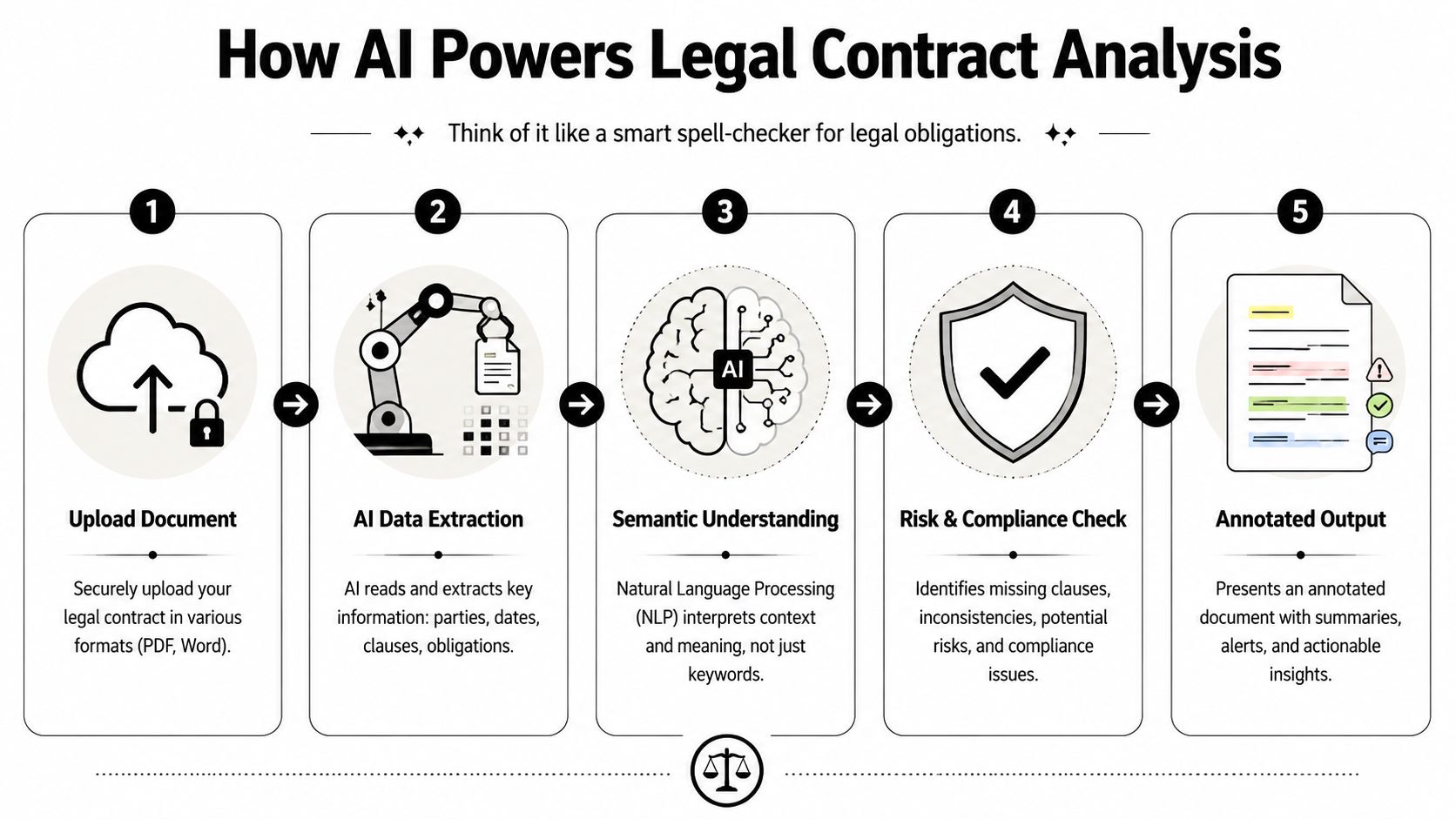
First, it turns messy input into usable text
Good tools don't assume you'll upload a pristine Word document. They accept scanned PDFs, phone photos, and marked-up agreements. The first task is cleanup. The system identifies the page structure, reads the text, and separates clauses from headers, signatures, and boilerplate blocks.
That sounds basic, but it's where weak tools fail. If the software can't cope with crooked mobile photos, faint scans, or redlined drafts, everything that follows gets shaky.
Then it identifies the clauses that matter
Once the text is readable, the scanner tries to classify sections by function. It isn't just spotting keywords like “termination” or “confidentiality.” It's trying to recognize the role a clause plays in the contract.
A useful system should distinguish between things like:
- Money terms such as fees, late charges, deposits, and renewals
- Risk transfer terms such as indemnities, warranties, and liability caps
- Control terms such as exclusivity, assignment, and amendment rules
- Exit terms such as termination windows, notice requirements, and survival clauses
That's where semantic understanding matters. Two clauses can use different words and still impose the same burden.
Next comes risk analysis
This is the jump from reading to judgment. A contract scanner worth using doesn't just label a clause. It evaluates whether the clause is broad, narrow, missing balance, or likely to deserve follow-up.
For a plain-language walkthrough of that broader process, this guide to AI contract analysis is useful.
A red flag isn't always a bad clause. Sometimes it's a normal clause written with unusually aggressive scope.
For example, “client owns deliverables” may be routine in one freelance deal. “Client owns all work product, ideas, methods, and prior materials” is a different animal. The software's value is in noticing the expansion.
Finally, it translates legalese into decisions
The last step is the one users directly feel. Instead of dumping extracted text into a panel, the tool should explain what the clause means in practical terms.
A good output sounds like this:
- Here's the clause
- Here's why it matters
- Here's the risk if you sign it unchanged
- Here's what to ask for or clarify
That's the difference between analysis and decoration. Highlighting text in yellow is easy. Helping someone understand whether a lease renewal clause needs negotiation is the true job.
Key Features of a Modern Legal Document Scanner
A modern legal document scanner should help you decide whether a contract deserves a closer look before you sign it. For everyday users, that matters more than raw scanning speed.
Paper handling still matters, of course. If a tool chokes on a crooked phone photo or a marked-up PDF, it will fail on the documents people deal with in real life. But the stronger products go further. They read messy inputs, isolate the clauses that matter, and turn dense contract language into usable warnings.
It handles imperfect documents well
Real contracts are rarely clean.
They arrive as screenshots, phone photos, exported PDFs, or redlined drafts pulled from an email chain at 11 p.m. A useful scanner needs to read through formatting noise and still identify the right clause boundaries. If it only works on polished sample files, it is a demo, not a tool.
Look for support for:
- Redlined drafts, including insertions, deletions, and comments
- Low-quality captures, such as angled photos or shadowed pages
- Mixed document types, including leases, job offers, NDAs, vendor terms, and loan agreements
Support for the contracts you handle matters more than a long feature grid.
It shows the clause behind the warning
A risk score without a citation is not much help. Good software points to the exact language that triggered the warning, then explains the issue in plain English.
That matters for a simple reason. Contract review is not just about spotting danger. It is about checking whether the software read the sentence correctly. If the tool cannot connect its conclusion to the text on the page, you cannot judge whether the warning is sensible, overblown, or missing context.
Treat unsupported alerts as prompts for review, not answers.
The better scanners also separate severity from certainty. A clause can be risky and still be common. A warning should tell you both.
It adapts to your role
The same sentence can create very different exposure depending on who is signing.
A one-sided non-compete lands differently for a senior employee than for a contractor with multiple clients. An automatic renewal clause means something different in a software subscription than in an apartment lease. A scanner built for the AI era should account for that context, because legal risk is rarely one-size-fits-all.
This is one of the clearest differences between old document software and modern contract analysis. Old tools asked, "Can I digitize this page?" Better tools ask, "What does this clause do to this person in this deal?"
It treats privacy as part of the product
Uploading a contract always creates a second question. What happens to the document after analysis?
That is not a side issue. Contracts often contain compensation terms, addresses, pricing, customer data, and internal business language that should not sit in a vendor's system longer than necessary. Before using any scanner, check the retention policy, whether documents are used for model training, and whether an account is required just to get a result.
One example is Redline, which lets users spot hidden traps in agreements by photo, PDF upload, or pasted text and states that contracts are processed for analysis but not retained or used for training.
It fits how people review documents now
A legal document scanner should not force a law-firm workflow onto someone reviewing a lease on their phone or a job offer between meetings.
Useful tools accept the contract in the form you already have it. That usually means:
- Upload a PDF from email
- Snap a photo of a printed page
- Paste text from a portal, email, or message thread
- Review on mobile or web without extra setup
Convenience sounds minor until you see how people behave under time pressure. If review takes too many steps, they skip it. That is how bad clauses survive.
Real-World Use Cases for AI Contract Review
The easiest way to judge a legal document scanner is to stop thinking about technology and start thinking about moments. Contracts usually become dangerous when someone is rushed, tired, or told the document is “standard.”

Freelance work and hidden ownership grabs
A designer gets a client agreement for a branding package. The fee looks fine. The timeline looks normal. The trap sits in the ownership language.
The contract doesn't just assign the final deliverables. It reaches further and tries to claim drafts, concepts, methods, and anything created “in connection with” the project. That language can swallow preexisting templates, processes, and reusable assets if no one flags it.
An AI scanner is useful here because it can identify that the issue isn't the presence of an IP clause. It's the scope.
Apartment leases and fee landmines
A renter receives a lease plus several addenda. The monthly rent isn't the only number that matters. Actual exposure may sit in cleaning charges, renewal procedures, move-out conditions, or notice requirements tucked into an attachment.
A legal document scanner can pull those obligations into one view instead of making the renter hunt through dense boilerplate. That changes the conversation from “I think this lease is long” to “This clause gives the landlord broad discretion to charge after move-out.”
Here's a short explainer on how contract review tools think through risk in practice:
Vendor NDAs and one-sided indemnity
A small business owner signs a vendor NDA and assumes it's harmless because “it's just confidentiality.” Then the indemnity clause shows up. It requires one side to cover a broad category of losses without a matching obligation on the other side.
That's a classic place where people miss the underlying issue. They focus on confidentiality and overlook risk transfer.
Some of the most expensive language in a contract sits under the least exciting heading.
Job offers and future restrictions
An offer letter often feels celebratory, which makes it easier to skim. But the attached restrictive covenant, confidentiality agreement, or equity paperwork may carry the true sting.
A scanner helps when it can translate broad non-compete language, odd clawback terms, repayment obligations, or fuzzy equity conditions into plain English. That doesn't replace a lawyer for a major decision. It does help someone ask smarter questions before they're emotionally committed.
Your Buyer's Checklist for Choosing a Scanner
A common mistake when comparing legal document scanners is focusing on the wrong criteria. A polished interface, PDF upload, and an AI label do not tell you whether the tool will catch a renewal trap in a gym contract or a one-sided liability clause in a vendor agreement. The buying question is simpler: will this tool help you make a safer signing decision?
That standard rules out a lot of flashy products.
A hardware scanner is judged on whether it captures a full legal-size page and preserves marks in the margins. A modern legal document scanner has a harder job. It needs to read meaning, connect clauses, and explain risk in plain English. If you want a tool that can spot hidden traps in agreements, test for judgment, not just file handling.
The questions worth asking
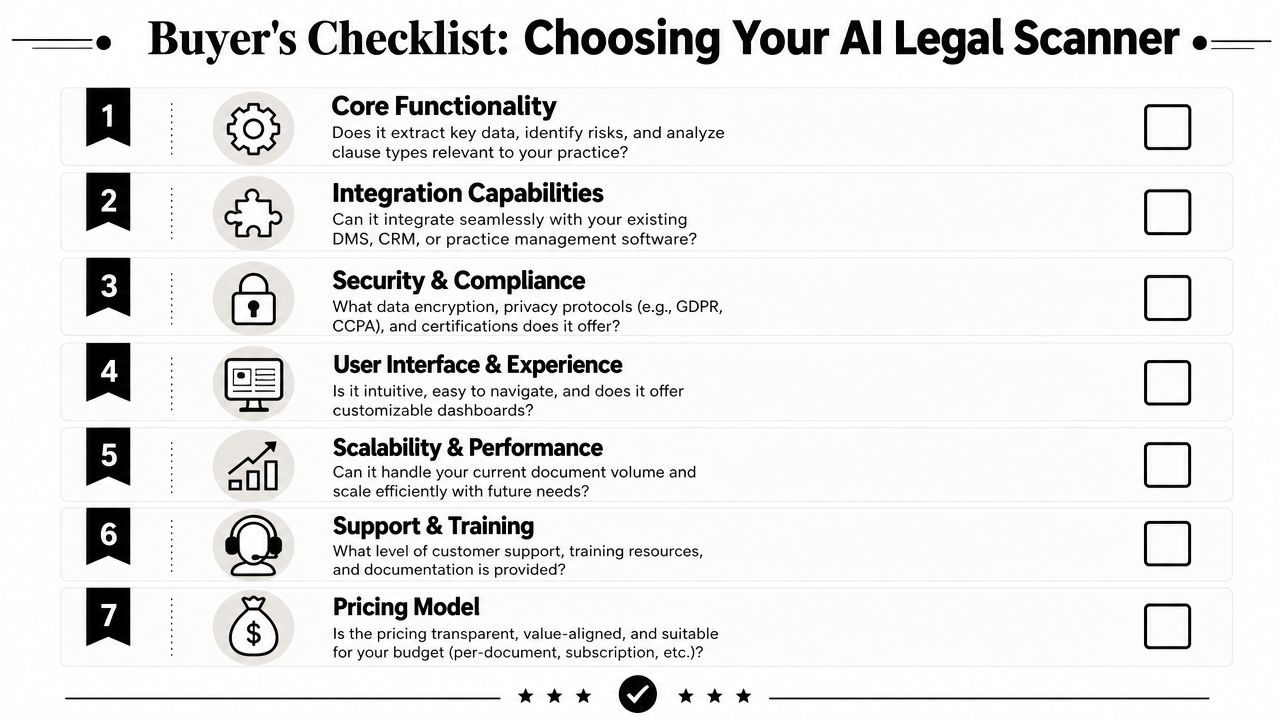
Use this checklist before you trust any scanner with a real contract.
| Evaluation Criteria | What to Look For |
|---|---|
| Core functionality | Clear clause identification, risk spotting, and plain-English explanations tied to source text |
| Document fit | Support for the contracts you handle, such as leases, NDAs, offers, subscriptions, or loan terms |
| Messy-input tolerance | Good performance on scans, mobile photos, and marked-up documents, not just clean PDFs |
| Privacy terms | Straight answers on retention, AI training use, account requirements, and data handling |
| Actionability | Follow-up questions, negotiation help, or draft language that helps you respond |
| Workflow fit | Mobile and desktop access, plus easy upload by photo, PDF, or pasted text |
| Pricing model | A plan that fits occasional review or frequent use without forcing the wrong commitment |
What separates a serious tool from a demo
The gap shows up fast in real use.
Some products can label clauses but cannot explain why the clause matters in this deal. Others flag everything as risky, which trains users to ignore the warnings. The weakest tools stop at diagnosis. They tell you a term is a problem, then leave you alone with the problem.
A serious scanner should help you move from review to response. That means it points to the exact language, explains the practical consequence, and gives you a usable next step, whether that is a question for the other side or a revision to request.
Buy for the documents that create risk
Many buyers find themselves distracted by feature grids. The right test set is not a batch of clean sample PDFs. It is your own stack of ordinary agreements: apartment leases, contractor agreements, offer letters, software subscriptions, guaranties, and renewal forms.
Run a few through the product before you commit. See whether it catches the clause that matters, not just the heading. A tool that performs well on a law school sample contract can still miss the sentence that lets a landlord keep a deposit or lets an employer change commission terms.
Build it into your workflow
The best scanner is the one people use before they sign.
Set a simple rule. Any document involving money, ownership, restrictions, or automatic renewal gets reviewed first. That small pause is often the difference between spotting a hidden obligation early and arguing about it after the contract is in force.
Interpreting Results and Taking Confident Action
A scanner's output is an early warning system, not a verdict.
People usually make one of two mistakes after seeing a red flag. They treat the whole contract like a trap, or they wave the warning away because "everyone signs these." Both reactions are expensive. The first kills workable deals. The second lets ugly terms slip through because they were buried under familiar headings.
Read the flag like a negotiation prompt
When a clause gets marked, run three checks:
- What am I agreeing to do, pay, restrict, or transfer?
- What is the principal downside if the other side enforces this term?
- Do I want to accept it, narrow it, or ask for a clear revision?
That shift changes the conversation fast.
A highlighted auto-renewal clause stops being a vague warning and becomes, "Please confirm the notice deadline, renewal length, and whether cancellation must be in writing." A broad IP assignment clause becomes, "I can assign work created under this agreement, but I am not assigning preexisting tools, templates, or know-how."
Turn plain-English analysis into specific edits
Good output should help you respond with precision. Point to the section. State the business concern. Suggest replacement language. That is how ordinary people get through leases, offer letters, contractor agreements, and software terms without sounding like they are posturing.
For a useful companion to that process, review Redline's 8-point checklist before you send comments back.
The point of scanning is to stop agreeing blindly.
As noted earlier, the document scanner market is growing fast. The important change is not the hardware. It is the added layer of analysis. People do not just need cleaner digital files anymore. They need help spotting consequences before a landlord keeps the deposit, an employer rewrites commission terms, or a vendor locks them into a renewal they never meant to accept.
Redline is an AI-powered contract scanner for people who want a faster first pass on leases, job offers, NDAs, subscriptions, and other agreements. You can snap a photo, upload a PDF, or paste text, then review plain-English risk highlights linked to the exact clause so you can verify what matters before you sign.
Keep reading
10 Contract Negotiation Strategies for 2026
Master contract negotiation strategies for 2026. Learn to prioritize terms, frame asks, and spot risks in leases, job offers, and more with these 10 tips.

84-Month Auto Loan: The 7-Year Math the Dealer Doesn't Want You to See
22.9% of new-car loans now run 84 months. The interest cost, the negative-equity timeline, and the three scenarios where a 7-year loan actually pencils out.
A Guide to Your Remote Worker Agreement
Draft, review, and negotiate a remote worker agreement with confidence. Our guide covers key clauses, tax issues, red flags, and how to spot hidden risks.

ACV vs Replacement Cost: The Depreciation Math, the 24-Month Rule, and the Roof-Schedule Trap That Pays $4,200 on a $22,000 Roof
Roof claim came in at 25% of the quote? Here's the ACV vs replacement cost math, the 24-month rebuild rule, and the roof-schedule endorsement that quietly cuts your payout.
AI Contract Review: Your Secret Weapon Against Bad Deals
Learn how AI contract review works, what risks to watch for, and how to use it to spot unfair clauses in leases, job offers, and more. A guide for 2026.

Amazon Flex Contractor Terms: Block Forfeiture, Cargo Indemnity, and the $61.7M Tip-Skim
The block-forfeiture clause that docks pay for one missed block. The cargo indemnity that survives Amazon's app routing errors. The FTC v. Amazon Flex tip-skim settlement and what is still in the contract.

Anti-Concurrent Causation: The Insurance Clause That Denies Hurricane Wind Claims for Flood Reasons, and the 4 States That Refuse to Enforce It
Hurricane wind blew off the roof. The carrier denied the whole claim citing flood. Here's the anti-concurrent causation clause, the 4-state carve-out, and the Helene/Milton denial pattern.
Arbitration Clause Meaning: Know Your Rights
Understand the arbitration clause meaning before you sign. Learn your rights, spot risky terms, and negotiate contract changes effectively.

As-Is Used Car Sale: What 'No Warranty' Actually Lets the Dealer Get Away With
The Buyers Guide on the window has two versions. The one with 'AS IS — NO WARRANTY' checked still doesn't do what most dealers say it does. The state list, the federal floor, and the 90-day rule.

Auto Insurance Contract Red Flags: The Five Lines That Decide Whether You Walk Away Whole
The state minimum is a five-minute conversation, not real coverage. Stacked vs unstacked UM, diminished value, limited tort, and the comparative-fault math that decides what you actually recover.

Auto Loan Contract Red Flags: The Seven Shapes
Seven patterns in every auto loan contract: APR disclosures, F&I add-ons, trade-in math, arbitration, repossession, and the federal shield most buyers don't know.

Best AI Contract Review Apps in 2026: An Honest Comparison
A side-by-side look at the consumer AI contract review apps in 2026. Redline, Justee, Contract Crab, DocuSign Iris. Pricing, what each does well, what it skips.

Buyer's Agent Agreement Post-NAR Settlement: The Four Lines That Are Now Negotiable
Post-NAR settlement, the buyer-broker agreement is now required and now negotiable. The four lines to fight: compensation rate, exclusivity term, property scope, and the seller-pays gap.

Cap Cost Reduction on a Lease: When $3,000 Down Disappears
The $3,000 due at signing on a lease ad is mostly cap cost reduction. Here is what it actually buys, when it vanishes, and the handful of states where it can pay for itself.

Car Lease Red Flags: 5 Tricks Dealers Use to Pad Your Monthly Payment
Five car lease tricks that quietly add thousands to your monthly payment. Real F&I clause language, the federal disclosures that don't apply, and how to push back.

CareCredit Deferred Interest: The Retroactive 26.99% APR Most Cardholders Don't See Coming
CareCredit's deferred interest is not 0%. It is 0% only if you pay the entire balance by the promotional end date. Miss it by a day and the full balance gets billed back at 26.99% from the original purchase date. The CFPB $34.1M action, the math, and the fix.

Cell Phone Early Termination Fees, Decoded: What You Actually Owe
What carriers really charge to leave early, why your device installment loan is the new ETF, and how to switch carriers without paying twice.
Contract Red Flags: The Five Shapes Every Bad Clause Takes
Every bad contract clause fits one of five shapes. Real legalese, severity tiers, and what changed when the FTC withdrew three consumer-protection rules in 2026.
Contract Termination Clause: Your 2026 Guide to Exiting
Understand the contract termination clause before you sign. Our guide explains termination for cause, for convenience, and how to spot costly red flags.
Contracts for Small Business: Your Essential Guide
Master contracts for small business. Our guide covers essential agreements, critical clauses, and red flags to protect your venture. Avoid costly mistakes.
Credit Card Agreement: A Plain English Guide for 2026
Don't sign that credit card agreement yet. Our guide decodes the fine print, flags hidden fees and red flags, and shows you how to protect your money.

Dealer Add-Ons, Decoded: What's on the Sticker That Wasn't on the Window
GAP, VSC, paint sealant, nitrogen tires, VIN etch. The ten-times markup, what to cancel, and the FTC enforcement actions reshaping dealer pricing in 2026.

Dealer Doc Fees, Decoded: $85 in California, $800 in Maryland, Uncapped Almost Everywhere Else
17 states cap the doc fee. 33 don't. Florida and Georgia routinely charge $1,000+. Here's what the fee actually covers, where it's capped, and the OTD line that ends the conversation.
Deferred Interest Credit Cards: Your 2026 Guide
Understand deferred interest credit cards. Learn how retroactive interest works, spot red flags, and avoid costly 'no interest' traps. Be wise before you sign.

Do You Get Your Deposit Back If You Don't Sign the Lease?
Denied, or the landlord backed out? You should get it all back. Changed your mind? It depends on the receipt. When a holding deposit is refundable, plus a demand letter.
DoorDash Independent Contractor Agreement: What 'I Agree' Actually Signs You Up For
The five clauses every dasher e-signs without reading. Mandatory arbitration with a 30-day opt-out, deactivation at sole discretion, vehicle indemnity, and the FAA Section 1 question after Bissonnette.
Effective Insurance Policy Review Guide for 2026
Conduct an effective insurance policy review in 2026 with our guide. Spot red flags, understand coverage gaps, and ensure robust protection.
Employment Contract Review: A Step-by-Step Guide
Don't sign yet. This step-by-step employment contract review guide walks you through key clauses, red flags, and negotiation tactics to protect your career.

Flood Insurance NFIP Red Flags: The Four Coverage Gaps That Pay Zero on a $40K Loss
NFIP caps at $250K dwelling / $100K contents. Basement contents excluded entirely. 30-day waiting period. Risk Rating 2.0 doubled some premiums. Private flood insurance often beats it.
Freelance Contract Red Flags: The Eight Clauses That Eat Your Margin
Eight clauses that quietly turn a freelance gig into unpaid work, lost IP, or personal liability. Real legalese, severity tiers, and the state laws that protect freelancers in 2026.

Freelance Isn't Free Act: The $800 Threshold, the 30-Day Default Rule, and the Doubling-Damages Math That Makes a $4,000 Invoice Worth $8,000 + Attorney's Fees
Client ghosted on the invoice. Here's the $800 threshold, the 30-day default rule, the doubling damages math, and the four state laws that turn a $4K unpaid invoice into $8K plus attorney's fees.
Hidden Apartment Fees: What's Legal, What's a Junk Fee, and How to Push Back
The field guide to hidden apartment fees in 2026. What the FTC just fined Greystar and Invitation Homes for, the clause language to grep your lease for, and the fees you can actually push back on.

HOA Covenant Traps: The Three Clauses Buyers Miss in the 240-Page CC&Rs Binder
Special assessment authority, architectural review power, and selective enforcement. The three HOA covenant traps that cost the most after closing, with the documents to demand before signing.
HOA Special Assessment Rules: What to Know Before You Pay
Understand HOA special assessment rules before you get a surprise bill. Learn about limits, notice requirements, voting, and your rights as a homeowner.

Holding Deposit vs Security Deposit: What You Are Actually Paying
A holding deposit and a security deposit are two different legal instruments with different refund rules. A plain-English decision tree, the rollover clock, and where landlords get caught conflating the two.

Home Buying Red Flags: The 10 Traps in the Documents Between Offer and Keys
The ten home-buying red flags hiding between your accepted offer and the closing table. Real clause language, the federal disclosures that protect you, and what to negotiate before signing.

Home Contractor Contract Red Flags: The Mechanic's Lien Clause, the 10% Retainage Rule, and the Three-Day FTC Cooling-Off Right
Contractor handed you a one-page contract he wrote himself? Here's the mechanic's lien clause, the 10% retainage rule, and the FTC Cooling-Off Right that doesn't appear on his form.

Home Warranty Plans: The Three Denial Patterns and the State AG Actions That Prove the Pattern
Home warranty companies deny claims using three patterns: lack of maintenance, pre-existing condition, and coverage caps. State AGs have sued. Here are the denial patterns and the small-claims path.
How Early Termination Fees Actually Work (and When Landlords Can't Charge Them)
Early termination fees in residential leases. What's typical, when the fee isn't enforceable, and the federal and state laws that can cancel it entirely.

How Early to Renew a Lease: State Notice Rules and the Wait-30-Days Move
When to renew your lease, when to wait, and how to counter an early renewal offer with a rent increase. State-by-state notice rules and the negotiation script that works.

How Far in Advance Can You Sign a Lease? The 60 to 90 Day Window and What Actually Locks
How far in advance you can sign a lease, what locks at signing, and the holding-deposit trap that costs renters real money. Plain-English playbook with state-by-state cues.
How to Actually Cancel a Gym Contract (Without Paying for a Year You Won't Use)
The clauses gyms use to keep you paying after you quit, what your state law says about them, and the exact words to put in a cancellation letter.

How to Break a Lease: The 7 Legal Exits and How to Negotiate the Rest
A renter's guide to breaking a lease without owing thousands. The seven legal exit ramps, the duty-to-mitigate map, and the negotiation moves that work even when nothing protects you.
How to Calculate Prorated Rent: Three Methods, Three Different Answers
How to calculate prorated rent three ways, with real numbers for each, so you can check the landlord's move-in or move-out charge before you pay it.

How to Cancel a Subscription When They Make It Impossible
When the cancel button is hidden behind a phone tree, here's the playbook. State laws, the chargeback path, and the letter that creates a paper trail.

How to Get Out of an Auto-Renewal Contract: The Five-Step Escape
A step-by-step guide for getting out of an auto-renewal contract, the chargeback and state-law leverage that works when the cancellation window closed, and the four templates you can send today.
How to Get Your Security Deposit Back (Without Suing Your Landlord)
A renter's playbook for getting your full deposit back. The 21-day clock, the bad-faith multiplier, and the demand letter that makes corporate landlords pay up in 10 days.
How to Redline a Contract: A Practical Walkthrough
Learn how to redline a contract with confidence. This guide covers reading the document, spotting risky clauses, drafting changes, and negotiating like a pro.

Indemnification Clauses, Explained: What 'Hold Harmless' Actually Costs You
An indemnification clause turns a small contract into an unlimited bet. Here's what the four flavors actually mean, why "duty to defend" is the part that hurts, and how to negotiate it down.

Indemnity Clause Meaning: A Plain English Guide for 2026
Understand the indemnity clause meaning in your contracts. This guide explains risks, red flags, and negotiation tips for freelancers, tenants, and SMBs.

Independent Contractor vs Employee: Why Your 1099 Doesn't Decide It
A 1099 doesn't make you a contractor. The federal six-factor test, the state ABC test, and the contract clauses that quietly signal you're misclassified.

Instacart Shopper Agreement: The Tip-Baiting Clause and Three Other Traps
The clause that lets customers cut your tip 24 hours after delivery. The non-engagement metric. The chatbot-only deactivation appeal. The four mechanics inside the Instacart full-service shopper contract.

Insurance Claim Denied: The 5 Reasons Carriers Use, the 30-60-90 Day Appeal Timeline, and When to File with the Commissioner
Got a denial letter for a homeowners claim. Here's the 5-reason taxonomy carriers actually use, the appeal timeline, and the state UPPA your insurer doesn't want to invoke.

Insurance Policy Red Flags: The Five Clauses That Decide If Your Claim Pays
53% of Hurricane Helene claims denied. The five clauses that decide whether your insurance pays or stalls: exclusions, named-perils, ACV, anti-concurrent causation, and the appraisal clause.

Is Your Non-Compete Actually Enforceable? A Plain-English Guide
What non-competes really say, why most are narrower than they look, and what your old offer letter is worth now that the FTC ban has been withdrawn.
Landlord Red Flags: 12 Warning Signs to Catch Before You Sign
Landlord red flags to catch before you sign: what they say before and during the viewing, what hides in the lease, and how to check a landlord in 15 minutes.
Lease Mileage Overage: What 14,000 Extra Miles Costs at Turn-In
Lease mileage overage is $0.15 to $0.30 a mile at turn-in. Per-captive rates, the buy-upfront break-even, and the 14k mi/yr point where leasing stops working.

Lease Start Date vs Move-In Date: Which One Starts Your Rent?
Your lease start date is when rent starts. Your move-in date is when you get the keys. Who pays for the gap, and what to do if the unit is not ready.

Lease vs Buy at 7% APR: The Math That Changes Everything
Most lease vs buy posts use 4% APR and lease wins. At May 2026's real 7% auto-loan rates, the answer flips at 5 years of hold. Three scenarios, full math.

Life Insurance Beneficiary Traps: The Five Designations That Decide Who Gets the Money
Ex-spouse not removed, per stirpes wrong default, ERISA preemption, the slayer rule. Five beneficiary traps that pay the wrong person, and the five-minute review that fixes them.

Lyft Driver Agreement: Period 1, Period 2, Period 3, and the Insurance Gap You Pay For
The Lyft Driver Agreement names three periods. Coverage only kicks in fully during Periods 2 and 3. Period 1 is your personal insurance, and most personal policies exclude commercial use. The contract clauses behind the gap.

Master Your Car Rental Agreement: 2026 Insider Guide
Stop overpaying. Learn to decode your car rental agreement, spot hidden fees, and understand liability before you drive away in 2026.
Mastering Payment Terms in Contracts
Avoid bad payment terms in contracts. Spot red flags, negotiate like a pro, and ensure timely payment every time. Practical guide.

Money Factor Markup: How Dealers Hide $864 in Your Lease
The money factor on your lease worksheet is two numbers added together. The captive lender's buy rate, plus the dealer's markup. Here's how to separate them.
Mortgage Closing Disclosure Red Flags: The TRID Tolerance Buckets and the 60-Day Cure
TRID gives you 3 business days to compare the Closing Disclosure to the Loan Estimate. Zero-tolerance fees that increased are recoverable as a cure within 60 days. The federal rule, the cure script, the buckets.

Moving Company Contract: The 110% Rule, the 60-Cents-Per-Pound Trap, and the Hostage-Load Federal Violation
The estimate said $3,400. The driver wants $5,200 to unload. Here's the federal 110% rule, the four required documents, and why hostage loads are a federal crime.

NDA Explained in Plain English: What You're Actually Promising When You Sign
An NDA you sign at a job interview can outlast the job by twenty years. What confidentiality clauses actually do, what the Speak Out Act voided, and the four redlines worth asking for.

Negative Equity Trade-In: The $7,183 Question on Your Next Car Loan
30.9% of trade-ins are underwater. Rolling that balance into the next loan makes you 1.5x more likely to be repossessed within 2 years. The math, and the alternatives.

Normal Wear and Tear vs Damage: The Math Your Landlord Doesn't Want You to Do
A line-by-line guide to what counts as normal wear and tear, what counts as damage, and the useful-life math that turns a $1,400 carpet bill into $200.

Offer Letter Red Flags: 6 Clauses to Catch Before You Sign
Six offer letter red flags hiding in standard employment paperwork. Real clause language, the 2026 stay-or-pay laws in California and New York, and how to push back without losing the offer.

Paying a Security Deposit Before Signing a Lease: Is It Safe?
Paying a deposit before signing a lease is common and usually legal, but it is a holding deposit, not a security deposit. When you get it back and what to get in writing.

Personal Loan Agreement Red Flags: Origination Fees, Autopay Asymmetry, and the APR That Isn't
The origination fee that comes out of the principal. The autopay discount that disappears when your bank changes. The disclosed APR vs the effective APR. Four clauses every personal loan agreement hides and what TILA actually requires.

Proof of Income for Apartment Applications: What Landlords Accept
Proof of income for an apartment means pay stubs, an employment letter, tax returns or bank statements. See what to send for your case, plus the 3x rent math.
Redline vs ChatGPT for Contract Review: An Honest Comparison (2026)
Should you use ChatGPT or a dedicated app like Redline to review a contract? A side-by-side comparison of workflow, output, privacy, mobile fit, and pricing.
Rent Stabilization Laws: A Tenant's 2026 Guide
Understand rent stabilization laws in 2026. This guide explains your rights, how to check your unit's status, and spot illegal lease clauses.

Rental Scam Red Flags: How to Spot a Fake Listing Before You Pay
Rental scam red flags on Facebook, Craigslist and Zillow: the out-of-town landlord, the Zelle deposit, the fake lease, and what to do if you already paid.

Renters Insurance Coverage Traps: The Six Sub-Limits That Pay $1,500 on a $4,000 Loss
Your renters policy says $25K personal property. The fine print is six sub-limit categories at $1,000-$2,500 each. The scheduled property fix, the ACV vs RCV trap, and the roommate coverage gap.
Sample Limitation of Liability Clause: 7 Forms to Know
Find a sample limitation of liability clause for any contract. Explore 7 key examples with plain-English analysis of risks, pitfalls, and negotiation tips.

Severance Agreement Red Flags: OWBPA's 21-Day Window, the 7-Day Revocation Period, and the Three Releases You Can't Actually Waive
HR slid a 10-page severance across the table with 'sign by Friday.' Here's the OWBPA framework, the unwaivable releases, and the McLaren Macomb non-disparagement limit.
Severance Agreement Review: Get a Fair Deal
Get an expert severance agreement review. Spot red flags, negotiate better terms, and know when to get legal help before you sign.
Software Development Agreements: Negotiate Your Best Deal
Master your software development agreements. This guide reveals key clauses, hidden traps, and negotiation tactics to protect your IP and secure fair terms.

Solar Contract Red Flags: The 20-Year Trap on Your Roof
Escalator clauses, UCC-1 liens, transfer traps. What the door-to-door rep didn't show you, and the 3-day window where you can still walk away.

Storage Unit Rental Agreement Red Flags: The Lien Timeline That Auctions Your Stuff
Storage facilities can auction your unit faster than any other landlord-tenant relationship. California 14 days, Florida 5, plus contracts that expand the operator's rights to the legal maximum. The four clauses you signed.

Subscription Contract Red Flags: The Four Mechanisms That Compound While You're Not Looking
Auto-renewal, cancellation friction, unilateral ToS changes, ETFs. Why every recurring contract feels like a roach motel, and how the 2025–2026 legal landscape changes your escape routes.
Tenant Rights Security Deposit: Get Your Money Back in 2026
Understand your tenant rights security deposit. Learn about legal limits, deductions, demand letters, and how to get your money back in 2026.
The 8-Point Contract Review Checklist
Use this 8-point contract review checklist to spot red flags in liability, IP, termination, and payment clauses before you sign. For freelancers & tenants.
The Meaning of Severability: A Contract Guide for 2026
Grasp the meaning of severability in contracts. Learn what a severability clause is, its importance, and when it might not save your agreement.

Title Loan Agreement Red Flags: The 30-Day Rollover, the 300% APR, and the MLA 36% Cap
Title loans use your car as collateral. State APR caps range from 30% to 'no cap.' The Military Lending Act caps active-duty servicemembers at 36% MAPR. The agreement, the rollover trap, and the repo timeline.

Uber Arbitration Opt Out: The 30-Day Email, Word for Word, and What It Gets You
How to opt out of Uber arbitration as a driver: the exact email Uber's agreement requires, how to count the 30 days, what it changes, and how to keep proof.

Uber Driver Agreement Explained: What Tapping 'Yes, I Agree' Actually Signs
The Uber driver agreement in plain English: where to read it, what tapping I agree changes, the 30-day arbitration opt-out, deactivation, and insurance gaps.
Understanding a Quitclaim Deed: Risks & Usage in 2026
Learn about a quitclaim deed: its uses, risks, and how it differs from a warranty deed. Get essential filing steps for 2026.
Understanding the Jurisdiction Clause in Agreement
Confused by the jurisdiction clause in agreement? Learn what it means, the key risks involved, and how to negotiate it before you sign.
US Cellular Early Termination Fees After the T-Mobile Merger: What You Actually Owe
What US Cellular customers actually owe after the August 2025 T-Mobile acquisition, why your device installment loan survived the merger, and how the Keep and Switch reverse-payoff really works.
Wedding Catering Contract: The Headcount Lock, the Stacked Service Charge, and Two Other Traps
The headcount-lock date that bills you for guests who never showed. The 18 percent 'service charge' that is not the tip. The market-unavailable menu swap. Four clauses in your wedding catering contract that move real money.

Wedding DJ Contract: The Substitution Clause, the 3x Overtime, and the Equipment Indemnity
The clause that lets your booked DJ send a junior. The overtime rate that triples after midnight. The equipment-damage indemnity that makes you liable when a guest spills on the mixer. Three traps in your wedding DJ contract.

Wedding Florist Contract: The Substitution Clause That Swaps Your Peonies for Carnations
The 'florist's discretion' substitution clause. The wholesale-pricing pass-through with no cap. The setup and teardown fees below the line items. The breakage liability for rented vases. Four traps in your wedding florist contract.

Wedding Photographer Contract Red Flags: The Four Clauses Every Couple Signs Past
The non-refundable retainer most state contract law caps. The delivery window with no teeth. The copyright clause that keeps you from your own prints. The force-majeure language COVID rewrote. Four traps in your wedding photographer contract.

Wedding Venue Contract Red Flags: The F&B Minimum, the Preferred-Vendor Tax, and Three Other Clauses
The food-and-beverage minimum that stays fixed when your guest count drops. The 'preferred vendors only' clause that adds 10 to 50 percent per outside vendor. The overtime rate that triples at midnight. The five clauses to negotiate before you sign the venue.

Wedding Videographer Contract: The 12-Month Delivery Window, the Sync License, and Raw-Footage Rights
The delivery window measured in months with no SLA. The music sync-licensing exposure most couples never see. The raw-footage release the contract usually denies. Five clauses to negotiate in your wedding videographer contract.
What Is a Buyout Clause: Lease & Job Offer Guide
Discover what is a buyout clause, how it works in leases & job offers, and how to spot red flags. Our 2026 guide covers calculations, risks, and negotiation.
What Is a Force Majeure Clause: 2026 Essential Guide
Discover what is a force majeure clause, how it impacts contracts, and key elements for 2026. Spot risks before you sign.
What Is a Letter of Employment? Sample Letter and How to Get One Fast
A letter of employment is a signed note from your employer confirming your job, start date and pay. Copy a sample, request one fast, and see what gets checked.
What Is a Penalty APR? a 2026 Guide to This Costly Trap
Wondering what is a penalty APR? Learn how this hidden credit card fee works, what triggers it, and how to avoid or remove its 29.99% interest rates.

What Is a Personal Guarantee? The Sentence That Puts Your House on the Line
A personal guarantee turns your business contract into a personal one. Here's what the clause actually says, when you're really on the hook, and how to negotiate it down.
What to Look For in a Lease Agreement: 10 Red Flags
Don't sign yet. Learn what to look for in a lease agreement with our checklist of 10 clauses, red flags, and how to negotiate them before you move in.
What to Look For in a Lease Before You Sign
A national framework for reading a residential lease, with real clause language and state-by-state notes on security deposits, fees, and renewal.
When the Terms of Service Change on You: What's Enforceable, What Isn't
When a company quietly rewrites its TOS, the new terms often aren't binding. The case law is on your side, and the same clause that lets them change anything can void their own protections.

Why You Got Charged Again: Auto-Renewal Clauses, Decoded
What an auto-renewal clause means, why companies use them, and the state laws now doing the work the FTC's withdrawn click-to-cancel rule was supposed to do.

Yo-Yo Financing: When the Dealer Calls You Back After You Drove Off
The dealer calls four days later and says your financing fell through. Here's why the original contract may still bind them, and the 48 hours that decide everything.
Your Separation Agreement Template & Clause-by-Clause Guide
Get our free separation agreement template. This guide explains each clause, warns of red flags, and shows how to customize it for an amicable split.